




How to Use Google AI Studio to Build and Deploy AI Applications Faster
Jun 2026





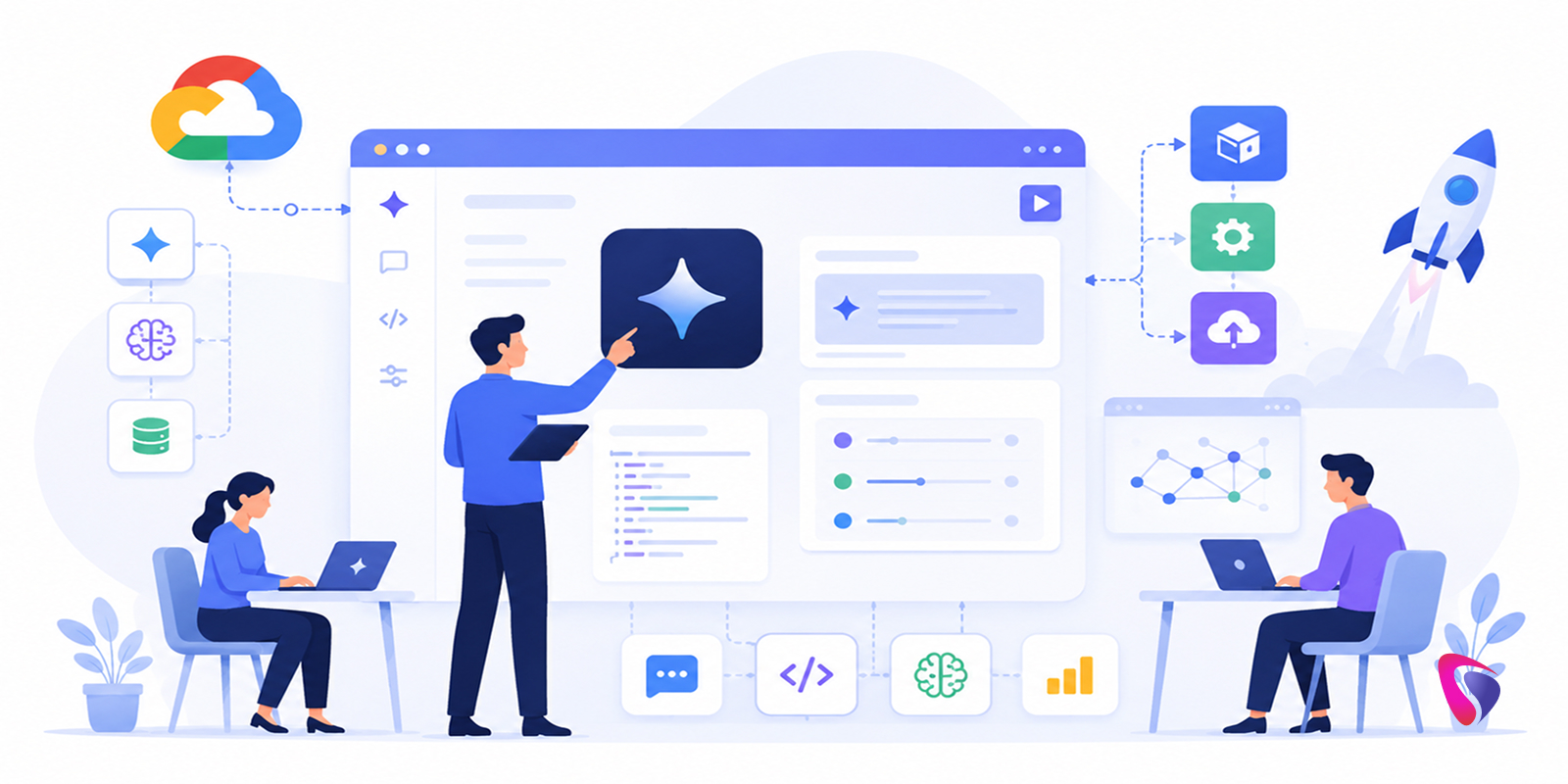

Most AI development conversations start in the wrong place. They begin with infrastructure - cloud setups, model configurations, API architecture, deployment pipelines - before anyone has confirmed that the underlying idea is worth building at all.
Google AI Studio flips that sequence. You start with the idea. You test it in minutes. You find out whether it works before you've committed weeks of engineering time to it.
That sounds like a small operational convenience. In practice, it changes what's feasible for development teams that don't have unlimited runway or a dedicated AI research staff sitting next to the product team. Startups, small software shops, product teams inside larger companies - these are the organizations where Google AI Studio has been quietly changing the pace of AI adoption in 2026, because the gap between "we have an idea for an AI feature" and "we have something users can actually interact with" has compressed in a way that genuinely matters.
This guide covers the platform honestly: what it does well, how to use it to build something real, where the implementation decisions get complicated, and what good deployment actually looks like once a prototype earns the right to become a product.
What Is Google AI Studio?
Google AI Studio is a web-based development environment for building, testing, and deploying applications powered by Google's Gemini AI models.
The simplest way to describe it: it's where you go to figure out whether your AI idea is any good, and then - if it is - where you begin turning it into something that connects to real systems and serves real users.
The environment gives developers immediate access to Gemini's capabilities without requiring infrastructure setup. You can write and test prompts, evaluate model responses, adjust configuration parameters, experiment with different interaction patterns, and generate API credentials - all from a browser, without spinning up servers or configuring deployment pipelines before you know what you're building.
That last part matters more than it sounds. The friction of traditional AI development isn't just technical - it's psychological. When validating an idea requires two weeks of setup work, teams tend to validate fewer ideas. When it requires thirty minutes, the conversation about what's worth building changes completely.
Why Google AI Studio Is Getting Serious Attention in 2026
The platform isn't popular because of any single feature. It's popular because it removes a category of friction that has historically slowed AI adoption in organizations without dedicated AI teams.
Senior AI engineers are expensive, competitive to hire, and rarely available at early-stage companies in the quantity that serious AI development seems to require. For teams that can't justify the cost or timeline to hire dedicated AI developer talent right away, AI Studio offers a way to validate ideas before that investment becomes necessary. Infrastructure configuration for AI systems - model serving, latency management, context handling, API security - is genuinely complex work that can consume weeks before a team has anything to show stakeholders.
Google AI Studio doesn't eliminate that complexity for production systems. What it does is defer it to the right moment. You don't need to solve infrastructure problems for an idea that hasn't been validated yet. You solve them for an idea that has earned the investment.
For startups, this means validating AI concepts before burning runway on engineering work that might be misaligned with what users actually need. For enterprises, it means getting to a proof of concept that decision-makers can interact with - rather than evaluate from a slide deck - before approving significant development resources. Both groups benefit from the same underlying shift: learning happens earlier, when it's cheap, rather than later, when it's expensive.
Key Features That Actually Matter in Practice
Prompt Engineering Playground
This is where most sessions start, and for good reason. The playground lets you write prompts, evaluate responses, iterate on wording, and compare outputs - all in real time, without writing any code.
It sounds basic. The practical value is that prompt quality determines application quality in ways that can't be compensated for downstream. A well-designed prompt consistently outperforms a mediocre prompt paired with extensive backend logic. Teams that invest real time in the playground before moving to implementation end up with significantly better applications than teams that treat prompt design as an afterthought.
Gemini Model Access
The models available through AI Studio cover natural language generation, summarization, reasoning, code generation, data analysis, and conversational AI. The breadth matters because most real applications touch more than one of these capabilities - a customer support assistant that summarizes conversation history, generates responses, and extracts structured data from user inputs is drawing on several of them simultaneously.
Multimodal Capabilities
Text-only AI applications are increasingly the exception rather than the rule. Google AI Studio supports working with text, images, documents, and structured data, which means Multimodal AI Development - applications that need to process invoices, analyze product photos, extract information from PDFs, or handle mixed-format inputs - can be prototyped in the same environment as pure text applications.
API Integration Path
Once a prototype is working well enough to move forward, AI Studio generates API credentials that connect the model to external systems - web applications, mobile apps, SaaS platforms, enterprise software. This is the bridge between "this works in a browser window" and "this works inside the product our users actually touch."
What Teams Are Actually Building With It
The range of applications coming out of Google AI Studio in 2026 is wider than the platform's positioning sometimes suggests.
Customer-facing chatbots are the most common starting point - support assistants, lead qualification systems, internal help desks, product recommendation tools. These are well-understood use cases with clear ROI, which makes them natural first projects for teams new to the platform.
Document processing is where a lot of the more interesting work is happening. Organizations sitting on large collections of contracts, reports, research papers, or customer communications are using AI Studio to build systems that extract information, generate summaries, identify patterns, and surface insights at a scale that manual review can't match.
AI agents - systems that can reason across multiple steps, access information from external sources, and execute sequences of actions rather than just generate text - are moving from experimental to practical for teams that have already gotten comfortable with the platform's foundational capabilities. Some teams pair this foundation with dedicated AI Agent Development services once they're ready to move from single-step prototypes to fully autonomous workflows.
Content generation tools, internal productivity assistants, AI-powered search interfaces, code review aids - the common thread isn't the category, it's that the underlying capability came from the same environment, and the path from prototype to integration followed the same pattern.
Building an AI Application With Google AI Studio: How It Actually Works
Start With the Business Problem, Not the Technology
This sounds obvious and gets ignored constantly. Teams that open AI Studio and start experimenting with prompts before they've clearly defined what success looks like tend to produce impressive-looking demos that don't connect to anything real. The question worth spending time on before touching the platform: what specific problem does this solve, for whom, and how will you know if it's working?
Customer service automation, document summarization, AI-powered search, sales support, workflow automation - the use case shapes every subsequent decision about prompt design, model configuration, and integration architecture.
Prompt Design Is the First Real Engineering Decision
Once you're in the platform, prompt engineering is where the most consequential early work happens. Start with something direct and specific - "Act as a customer support assistant for a SaaS company, helping users troubleshoot account and billing issues" - and evaluate the response quality honestly.
What you're testing isn't whether the AI can generate coherent text. It can. You're testing whether the outputs are accurate, appropriately scoped, consistent across different types of inputs, and useful enough that a real user would find them valuable rather than frustrating. That evaluation takes iteration, and the playground is where iteration is fastest.
Common refinements at this stage include adding specific constraints ("always ask for a ticket number before suggesting solutions"), defining the persona more precisely, specifying output format, and handling edge cases explicitly. Teams that skip this work and move to integration quickly tend to discover the gaps in production, which is a worse place to discover them.
Configure Model Parameters With Intent
Temperature settings, output length controls, context window configuration - these parameters have real effects on application behavior, and the right settings depend on the use case. A customer support assistant benefits from lower temperature settings that produce more consistent, predictable responses. A creative content tool might benefit from higher settings that produce more varied outputs.
Testing multiple configurations against representative inputs is how you find the settings that match your use case, not how a generic recommendation suggests your use case should behave.
Define the Application Logic Before Building Infrastructure
The AI model handles intelligence. Everything around it - how users interact with it, what data it has access to, how outputs get used downstream, when human review is triggered - is application logic that needs to be designed before integration work begins.
A customer inquiry handling system needs routing logic for different question types, escalation rules for situations the AI shouldn't handle, and a mechanism for capturing conversation data. Defining these workflows before writing integration code produces cleaner implementations than figuring them out during the build.
Generate API Access and Begin Integration
When prototype performance is strong enough to justify the investment, AI Studio generates API credentials that connect the model to external systems. This is where the prototype starts becoming a product - where Gemini's capabilities get embedded into the interfaces users actually interact with and the data systems that feed it context.
The integration layer typically involves a user interface, database connections, authentication, and business logic that sits between the user and the model. The AI Studio piece is well-defined at this point; the integration work is where most of the remaining engineering time goes.
Test Against Reality Before Declaring Done
Pre-deployment testing needs to cover more than whether the AI generates grammatically correct responses. It needs to cover response accuracy across the full range of inputs users will actually send - including the unusual ones, the edge cases, the adversarial inputs, and the things users will try that the design didn't anticipate.
Performance under load, latency at scale, behavior when external data sources are unavailable, security boundaries - these aren't afterthoughts. They're requirements that determine whether the application is trustworthy enough to put in front of real users.
Deployment: Getting From Prototype to Production
The deployment path depends on what you're building and who needs to access it.
Web applications are the most straightforward integration target - customer support portals, knowledge bases, SaaS product features. The Gemini API connects cleanly to standard web architectures, and most development teams are already comfortable with the surrounding infrastructure.
Mobile applications benefit from AI capabilities in ways that are increasingly user-facing rather than backend - productivity features, in-app assistants, intelligent search. The integration pattern is similar to web, with additional considerations around offline behavior and latency on mobile networks.
Enterprise system integrations - CRM platforms, ERP systems, internal productivity tools - tend to be the most complex deployments because they involve connecting to legacy infrastructure, navigating security requirements, and working within data governance frameworks that weren't designed with AI integrations in mind. Planning for this complexity early, rather than discovering it at the integration stage, is consistently the difference between deployments that go smoothly and ones that stall.
AI agent architectures - where the system needs to reason across multiple steps, access external information, and take actions rather than just generate text - are increasingly feasible to build on top of AI Studio's foundation, but they require more careful design around what the agent can do autonomously versus what requires human approval.
What Can Go Wrong - and How to Plan for It
Hallucinations in High-Stakes Contexts
AI models generate confident-sounding outputs that are sometimes wrong. This is a known characteristic of the technology, not a defect that will be patched in the next release. Applications where incorrect outputs carry real consequences - medical information, legal guidance, financial decisions - need verification mechanisms that don't assume model accuracy. Human review loops, confidence thresholds, and explicit uncertainty communication are design requirements, not optional additions.
Security and Data Governance
Applications that handle sensitive data need to be designed with access controls, data handling policies, and audit trails from the start. The convenience of AI Studio's development environment doesn't reduce the governance requirements that apply to whatever you build with it. Organizations in regulated industries need to map their compliance obligations before the integration stage, not after.
Cost Management at Scale
API usage costs scale with volume, and the gap between prototype costs and production costs can be significant. Monitoring usage, setting budget alerts, and modeling cost at projected scale before launch are straightforward practices that prevent unpleasant surprises.
Integration Complexity in Enterprise Environments
Enterprise deployments almost always take longer and cost more to integrate than the initial estimate suggests. Legacy systems, undocumented APIs, data in inconsistent formats, security review requirements - these are standard features of enterprise integration work, not exceptional circumstances. Planning for them honestly is how you deliver on time.
Why This Platform Makes Sense for Both Startups and Enterprises
The value proposition is different for each, but both groups are benefiting from the same underlying shift.
Startups benefit from validation speed. The ability to prototype an AI feature, test it with real users, and gather meaningful feedback in weeks rather than months changes which ideas are feasible to pursue on a limited budget. The infrastructure investment comes after validation, when the idea has earned it.
Enterprises benefit from proof-of-concept speed. Getting from "we think AI could help with this" to "here is a working demonstration you can interact with" compresses the evaluation cycle in ways that matter for organizations where significant development investments require executive approval. A working prototype is a more persuasive argument than a slide presentation, and it's possible to build one in a fraction of the time traditional AI development would require.
Both groups are accessing advanced AI capabilities through an environment that doesn't require building that capability from scratch - which is the actual competitive advantage Google AI Studio offers in a market where building from scratch is increasingly the slower, more expensive option.
Where AI Application Development Is Heading
Google AI Studio's existence reflects something broader happening in software development: AI is becoming a foundational layer of applications rather than a specialty feature that only some products have.
The near-term trajectory points toward more autonomous AI agents handling multi-step tasks across systems, more multimodal applications that work naturally across text, image, and structured data, and natural language interfaces becoming the primary interaction pattern for a growing category of business software.
The teams learning to build on platforms like AI Studio now are building organizational capability that compounds. The first project teaches the team how to design prompts well. The second project teaches them where integration gets complicated. The third project moves faster than the first two combined because the learning is already there.
Organizations that wait for the technology to stabilize before engaging with it tend to find that the gap between them and early movers is wider than expected - because the advantage isn't just the tool, it's the accumulated experience of having built things with it. Partnering with a leading AI development company during this phase can help compress that learning curve for teams that don't have the bandwidth to build it entirely in-house.
Conclusion
Google AI Studio is worth understanding seriously, not because it's the only platform in this space, but because it represents the clearest current example of what happens when AI development friction drops far enough that the limiting factor becomes ideas rather than infrastructure.
For startups, it means testing assumptions before they become expensive commitments. For enterprises, it means getting to working demonstrations without weeks of setup work that delays every evaluation. For development teams of any size, it means the cycle from concept to testable prototype runs in a different unit of time than it used to.
The challenges are real - hallucination risk, security requirements, integration complexity, cost management at scale. None of those get solved by the platform itself. What the platform does is move the hard problems to the right moment: after you know you're building something worth solving them for.
That's a different way to develop AI applications. And in 2026, it's increasingly the way that the work actually gets done.

Frequently Asked Questions
It's a browser-based environment for building and testing AI applications using Google's Gemini models - no infrastructure setup required. It's built for startups, product teams, and enterprises who want to validate ideas fast before committing engineering resources.
Not at the start. The platform is designed to let you test ideas through prompt experimentation before writing a single line of code. Technical depth matters more once you move toward integration and production deployment.
Days, not weeks. That's the core value proposition. The setup friction that used to consume two weeks of engineering time before you had anything testable is largely gone.
Three main ones: hallucinations in high-stakes outputs, data governance gaps if sensitive information is involved, and integration complexity that's consistently underestimated in enterprise environments. None are dealbreakers - all need deliberate planning.
Both - but for different reasons. Startups use it to validate before spending. Enterprises use it to build working prototypes that executives can actually interact with, compressing approval cycles that used to run on slide decks alone.
Harnil Oza is the CEO & Founder of Hyperlink InfoSystem. With a passion for technology and an immaculate drive for entrepreneurship, Harnil has propelled Hyperlink InfoSystem to become a global pioneer in the world of innovative IT solutions. His exceptional leadership has inspired a multiverse of tech enthusiasts and also enabled thriving business expansion. His vision has helped the company achieve widespread respect for its remarkable track record of delivering beautifully constructed mobile apps, websites, and other products using every emerging technology. Outside his duties at Hyperlink InfoSystem, Harnil has earned a reputation for his conceptual leadership and initiatives in the tech industry. He is driven to impart expertise and insights to the forthcoming cohort of tech innovators. Harnil continues to champion growth, quality, and client satisfaction by fostering innovation and collaboration.
Latest Blogs



Is BlockChain Technology Worth The H ...
Unfolds The Revolutionary & Versatility Of Blockchain Technology ...


IoT Technology - A Future In Making ...
Everything You Need To Know About IoT Technology ...
Feel Free to Contact Us!
We would be happy to hear from you, please fill in the form below or mail us your requirements on info@hyperlinkinfosystem.com
Hyperlink InfoSystem Bring Transformation For Global Businesses
Starting from listening to your business problems to delivering accurate solutions; we make sure to follow industry-specific standards and combine them with our technical knowledge, development expertise, and extensive research.

4500+
Apps Developed

1200+
Developers

2200+
Websites Designed

140+
Games Developed

120+
AI & IoT Solutions

2700+
Happy Clients

120+
Salesforce Solutions

40+
Data Science

