




How to Save 30–70% Using Reserved Instances, Savings Plans, and Azure Reserved Capacity



In the traditional on-premises data center model, "cost" was a capital expenditure (CapEx) event—you bought a rack of servers, and their cost was sunk over a five-year depreciation cycle regardless of whether they ran at 5% or 95% capacity. The cloud promised to turn this from capital expenditure to operational expenditure (OpEx). OpEx comes with the flexibility of "Pay-As-You-Go". However, many enterprises found a hidden "on-demand premium" associated with it.
To bring about optimization and achieve savings in the 30–70% range, transition from reactive consumption to proactive financial engineering is a must. This first module deconstructs the underlying economic principles of Azure’s commitment models.
The Economic Foundation: The On-Demand Premium
Azure’s Pay-As-You-Go (PAYG) model is essentially a "liquidity premium." Microsoft charges a surplus to maintain standby capacity and manage the risk of underutilized hardware.
For transient or burst workloads (e.g., CI/CD runners, batch processing), this premium is a justified cost of agility. However, for workloads exceeding 25–30% sustained utilization, remaining entirely on-demand is economically irrational. Commitment instruments function as predictability contracts. By guaranteeing demand over a 1 or 3-year term, enterprises exchange flexibility for discounted rates — Reserved Instances can reach up to 72% reduction in unit cost, while Savings Plans offer up to 65%.
Enterprise Commitment Readiness Assessment
Before committing capital, architectural hygiene must be validated. Committing to an unoptimized environment "locks in" inefficiency for 36 months.
Tag Governance & Metadata Audit
Financial modeling is only as accurate as your telemetry. If tagging coverage is below 95%, the risk of "stranded" costs—where a department is billed for resources they no longer own—is high.
- Enforcement: Use Azure Policy to deny the creation of any resource lacking CostCenter, Owner, and Environment tags.
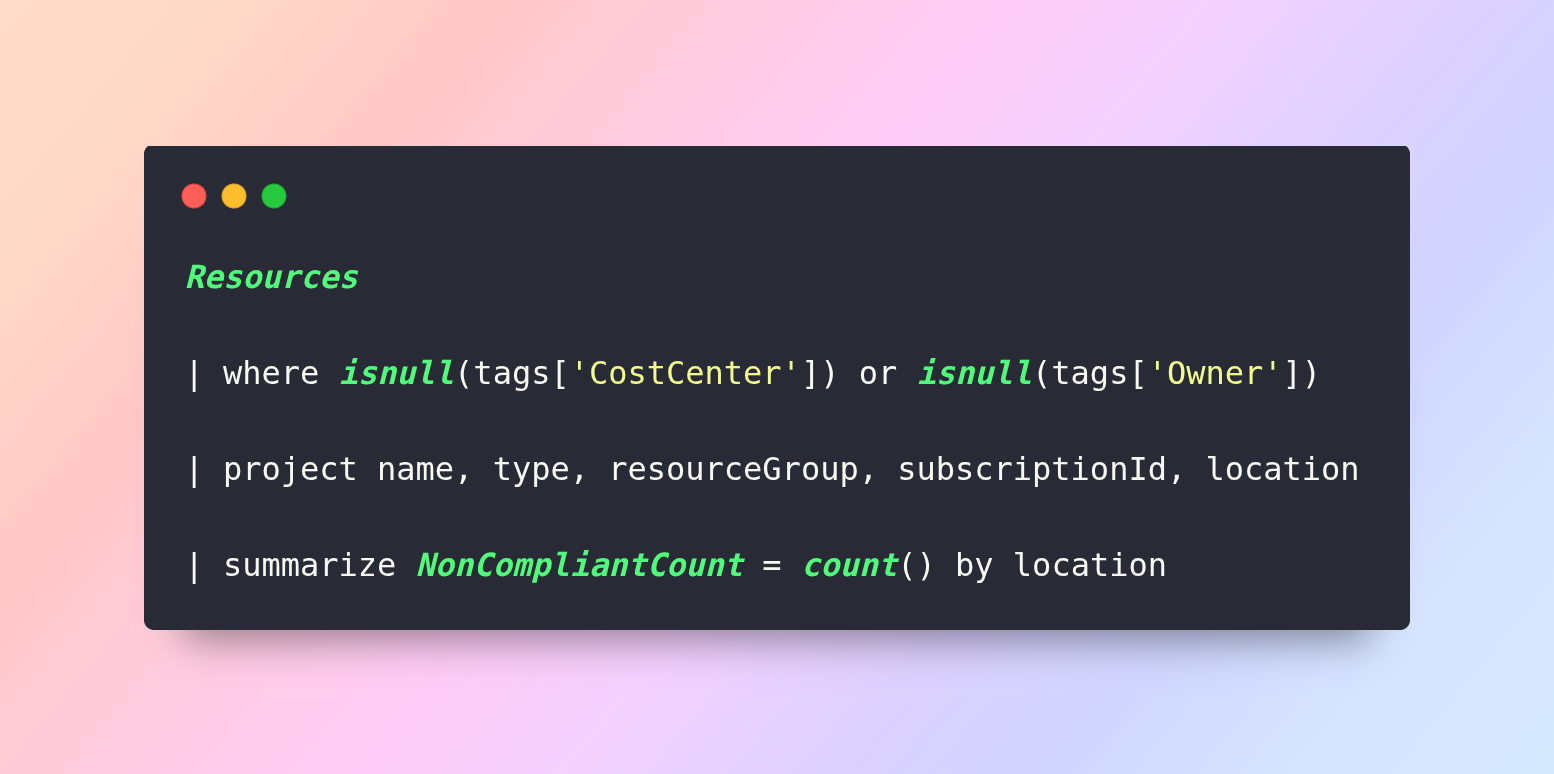
The Technical Audit (KQL): Use the following Kusto Query in Azure Resource Graph Explorer to identify non-compliant assets:
The "Zombie" Resource Deep-Dive
A "Zombie" is any resource that generates cost but delivers zero business value. Before modeling a baseline, these must be purged via automation.
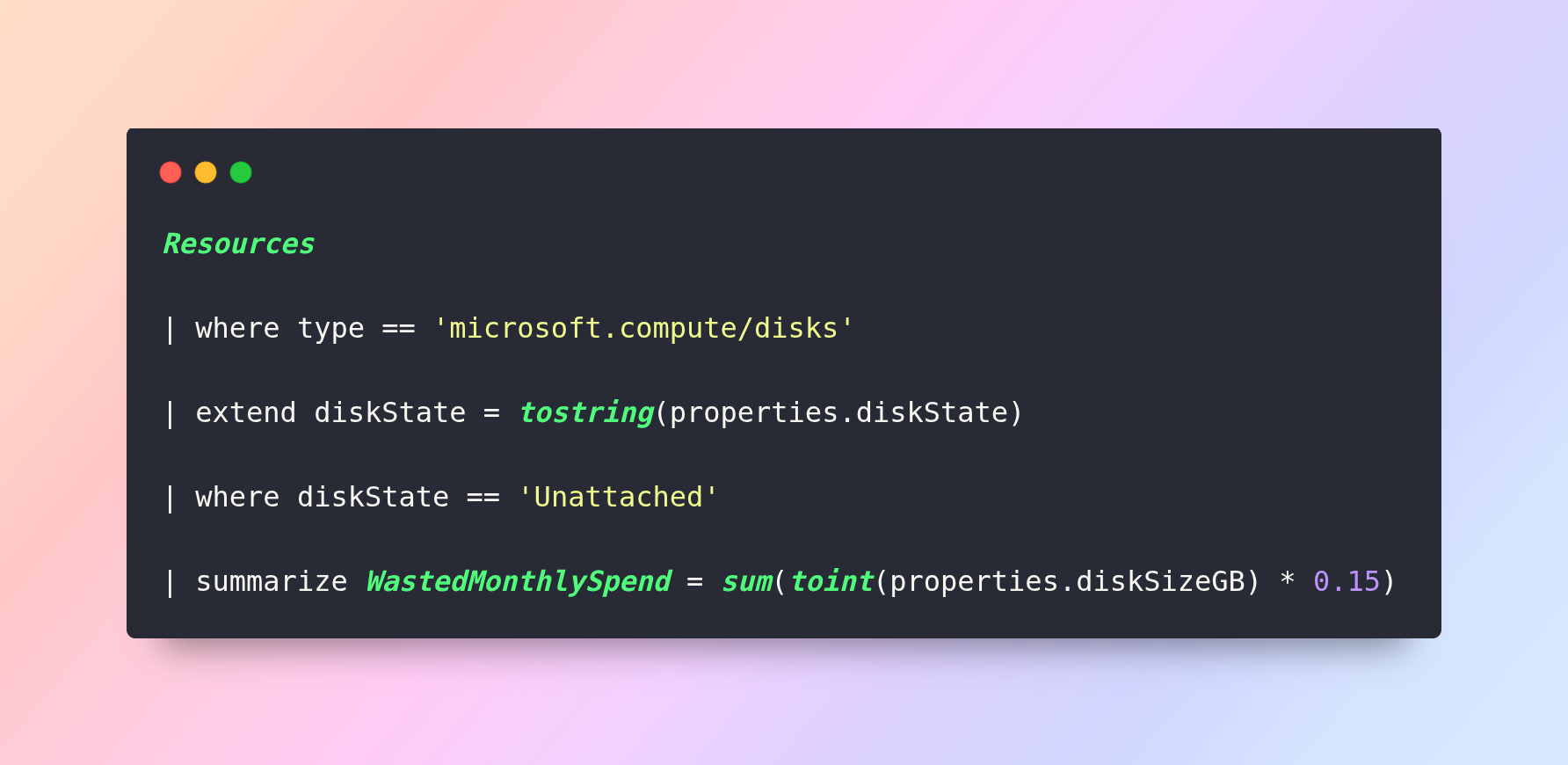
Unattached Managed Disks: When a VM is deleted, its Managed Disk often remains, billing at full rate.
- Automation via Azure Logic Apps: Implement a "Sweep-and-Notify" workflow.
- Trigger: Monthly recurrence.
- Action: Query Resource Graph for unattached disks.
- Action: Send an automated email to the Owner tag.
- Action: If no "Keep" response is received in 72 hours, delete the disk.
SKU Standardization Index
Excessive fragmentation reduces the efficiency of Instance Size Flexibility.
|
VM Family |
Use Case |
RI Flexibility |
Recommendation |
|
Dsv5 |
General Purpose / Web |
High (ISF) |
Primary Standard |
|
Esv5 |
Memory Intensive / DBs |
High (ISF) |
Primary Standard |
|
Fsv2 |
Compute Intensive |
High (ISF) |
Secondary Standard |
Leverage Azure Advisor for Automated Baseline Recommendations
Before manually modeling your commitment floor, always start with Azure Advisor. Azure Advisor automatically generates RI and Savings Plan purchase recommendations based on your last 30 days of eligible Pay-As-You-Go usage — directly inside the Azure Portal under Cost Management + Billing > Advisor Recommendations.
Advisor calculates the optimal commitment level by analyzing your VM usage patterns, identifying stable workloads, and recommending the most cost-effective term (1-year vs. 3-year) for each resource family. This removes significant manual analysis time and serves as the quantitative starting point for all commitment modeling.
|
Note |
Treat Advisor output as the baseline — not the final answer. Advisor uses a 30-day lookback window, which may not capture seasonal peaks or upcoming migrations. Always cross-validate with a 12-month historical export before finalizing commitments. |
Agreement Type Matters: MCA vs. Enterprise Agreement (EA)
It’s important to note that a significant portion of mid-market enterprises operate under a Microsoft Customer Agreement (MCA). The commitment mechanics differ in important ways that affect strategy:
|
Factor |
Enterprise Agreement (EA) |
Microsoft Customer Agreement (MCA) |
|
RI Scope |
Enrollment-level Shared Scope available |
Billing Profile-level Shared Scope |
|
Savings Plans |
Full support across Enrollment |
Supported at the Billing Profile level |
|
Cancellation Cap |
$50,000 per 12-month rolling window |
$50,000 per 12-month rolling window |
|
Exchange Policy |
RI-to-RI and RI-to-SP supported |
RI-to-RI and RI-to-SP supported |
Verify your agreement type before building any commitment model. The billing hierarchy (Management Group → Subscription → Resource Group) determines how Shared Scope reservations propagate and which teams benefit from the discount.
Baseline Modeling & Workload Segmentation
Savings begin with granular measurement. Extract 12 months of Azure Cost Management data to define your "Energy Signature."
Defining the Commitment Floor
The Commitment Floor is the absolute minimum hourly spend or resource count encountered in a rolling 12-month window.
Commitment_Floor = Min_Sustained_Usage x 0.95
Segmentation Matrix
|
Workload Type |
Utilization Profile |
Strategy |
|
Static Baseline |
24/7, stable (e.g., Prod DBs) |
3-Year Reserved Instances |
|
Predictable Variable |
Business-hour scaling (e.g., VDI) |
1-Year RIs or Savings Plan |
|
Transient/Burst |
Dev/Test, Batch Jobs |
Spot Instances or PAYG |
Rightsizing: The Mathematical Pre-requisite
Never reserve inefficient workloads. Rightsizing reduces costs by 10–20%, and its effects are multiplied once a commitment is applied.
Technical Rightsizing Thresholds
- CPU: If sustained CPU is < 15%, downsize by one SKU tier.
- Memory: If memory headroom is > 50%, move from an E-Series to a D-Series.
- Disk: Downsize Premium SSDs where throughput does not match provisioned IOPS.
The Multiplier Effect (Example)
|
Stage |
Monthly Cost |
Notes |
|
On-Demand VM (baseline) |
$100/mo |
Starting point |
|
After Rightsizing (50% reduction) |
$50/mo |
Eliminate over-provisioning first |
|
After 3-Year RI (60% discount) |
$20/mo |
Commitment applied to optimized VM |
|
Total Savings |
80% |
Committing before rightsizing costs you 60% of this gain |
The "Clawback" Strategy (Executive Governance)
When a central FinOps team saves $1M through commitments, where does the capital go?
Executive Rule: Implement a 50/50 Clawback. Return 50% of the savings to the Business Unit’s budget to incentivize cooperation. Retain 50% in a Central IT "Innovation Fund" to finance AI/ML pilots.
The Engineering of Compute Commitments
Reserved Instances, Savings Plans, and Normalization Mechanics
For the cloud executive, compute costs are often perceived as a moving target. However, Microsoft Azure provides specific "predictability instruments" that, when engineered correctly, convert the volatility of compute spend into a fixed, discounted utility. Success in this phase requires moving beyond simple "purchasing" and into Instance Engineering.
Reserved Instances (RI) Engineering
Reserved Instances provide the deepest discounts available for compute (up to 72%). They are not merely "coupons"; they are architectural commitments to specific infrastructure shapes.
The Scope Strategy: Shared vs. Single
A common failure in enterprise cost management is "Siloed Reservations."
- Single Subscription Scope: The RI is locked to one subscription. If that team migrates to a new subscription or deletes their VMs, the RI sits idle (stranded).
- Shared Scope: The RI is applied at the Enrollment Account or Management Group level. This allows the discount to "float" across the entire organization. If Team A scales down, Team B automatically consumes the unused reservation.
Executive Directive: Always default to Shared Scope unless regulatory or internal chargeback requirements strictly mandate isolation.
Instance Size Flexibility (ISF) and Normalization Factors
Most leaders believe an RI is tied to a specific VM size. Technically, an RI is a commitment to a total number of "Compute Units" within a VM family. Azure uses a normalization ratio based on a "Ratio of 1" for the smallest VM in a series.
Table: Normalization Ratios (D-Series v5 Example)
|
VM Size |
vCPUs |
Normalization Factor |
Total Units in RI |
|
D2s_v5 |
2 |
1.0 |
1 |
|
D4s_v5 |
4 |
2.0 |
2 |
|
D8s_v5 |
8 |
4.0 |
4 |
|
D16s_v5 |
16 |
8.0 |
8 |
|
D32s_v5 |
32 |
16.0 |
16 |
The Technical Insight: If you purchase an RI for one D32s_v5 (16.0 units), but the engineering team refactors the application into eight D4s_v5 VMs (2.0 units each), the RI coverage remains 100%. This flexibility drastically reduces the risk of long-term commitments in agile environments.
Savings Plans for Compute (SP)
While RIs are tied to a VM family (e.g., D-Series), Savings Plans are a commitment to a dollar-per-hour spend across any compute resource, regardless of family, region, or operating system.
The Savings Plan Formula
SavingsPlan_Commitment = (Total_Hourly_Compute_Spend - RI_Covered_Spend) x Safety_Margin
Savings Plans are ideal for:
- AKS (Kubernetes) Clusters: Where nodes might scale or change types frequently.
- App Services: Where the underlying infrastructure is abstracted.
- Modernization Windows: When you plan to move from Windows-based VMs to Linux-based containers.
The Laddered Commitment Strategy
One of the most overlooked risk mitigation techniques in enterprise FinOps is commitment laddering — staggering RI and Savings Plan purchases so that portions expire at different intervals, typically 12 months apart. This prevents the entire portfolio from renewing simultaneously and ensures regular opportunities to re-optimize.
Example — A $10M Annual Commitment Portfolio:
|
Tranche |
Amount |
Term |
Expiry |
Purpose |
|
Tranche A |
$4M |
3-Year RI |
Year 3 |
Stable DB & core compute |
|
Tranche B |
$3M |
1-Year RI (renewing) |
Year 1, 2, 3 |
Variable workloads |
|
Tranche C |
$3M |
1-Year Savings Plan |
Year 1, 2, 3 |
Kubernetes / modernization buffer |
This structure ensures that at every 12-month mark, the team can reassess architecture changes, migrate workloads, or exchange tranches without being locked into a monolithic 3-year block. World-class FinOps teams treat this like a bond ladder — matching maturity dates to technology roadmap milestones.
The Commitment "Waterfall" Strategy
To achieve a world-class Effective Savings Rate (ESR), you must "stack" these instruments. Azure applies discounts in a strict sequence every hour on the hour.
The Hourly Discount Execution Logic
- Direct Match (RI): Does a VM exactly match an available RI? (e.g., D2s_v5 in East US).
- Ratio Match (RI-ISF): Within the same family/region, can unused portions of larger RIs cover smaller VMs via normalization?
- Savings Plan Application: Any remaining vCPU hours are evaluated against the Savings Plan dollar commitment.
- Azure Hybrid Benefit (AHB): Is the LicenseType: Windows_Server attribute present? If so, the software fee is removed.
- Pay-As-You-Go: The final remainder is billed at the standard list price.
The RI Trade-In Mechanic: Exchanging Reservations for Savings Plans
A critical capability absent from most enterprise commitment strategies is the RI-to-Savings-Plan trade-in. Azure allows you to exchange existing VM Reserved Instances, Dedicated Host reservations, and App Service reservations for a new Azure Savings Plan. Up to 100 reservations can be exchanged in a single transaction, with the pro-rated refund value applied directly to the new Savings Plan commitment.
Why this matters for modernization: If your organization is migrating from IaaS (D-Series VMs) to PaaS (Azure Container Apps, Azure Functions), you no longer need family-specific RIs. Rather than waiting for RIs to expire, trade them in for a Savings Plan that covers the new architecture. This eliminates 'commitment lock-in' and prevents the most common modernization financial mistake: paying for stranded IaaS reservations while simultaneously paying on-demand rates for new PaaS workloads.
Multi-Region & Disaster Recovery (DR) Optimization
A common "leak" in cloud budgets is over-committing to DR regions.
The "Zero-Dollar" RI Exchange Mechanics
Enterprises often fear the 3-year commitment because they believe it is "Fixed." However, Azure allows for Exchanges.
- The Exchange Logic: You can trade an RI for a different family or region, provided the New RI has a cumulative value equal to or greater than the remaining value of the Old RI.
- The AMD Pivot: If you move from Intel to AMD (e.g., Dsv5 to Dasv5), you can exchange the RI mid-term to maintain your discount without paying more.
Regional Swap Engineering
If your organization migrates from US East to US West, the Savings Plan has a massive advantage: unlike RIs, Savings Plans are Region-Agnostic. If you move your entire data center to another continent, the Savings Plan follows you automatically.
Technical Drill-Down: Spot Instances for the Remainder
The "Remainder" is the 10-20% of spend that is too volatile for a 3-year RI. For non-production workloads, executives should mandate Spot Instances.
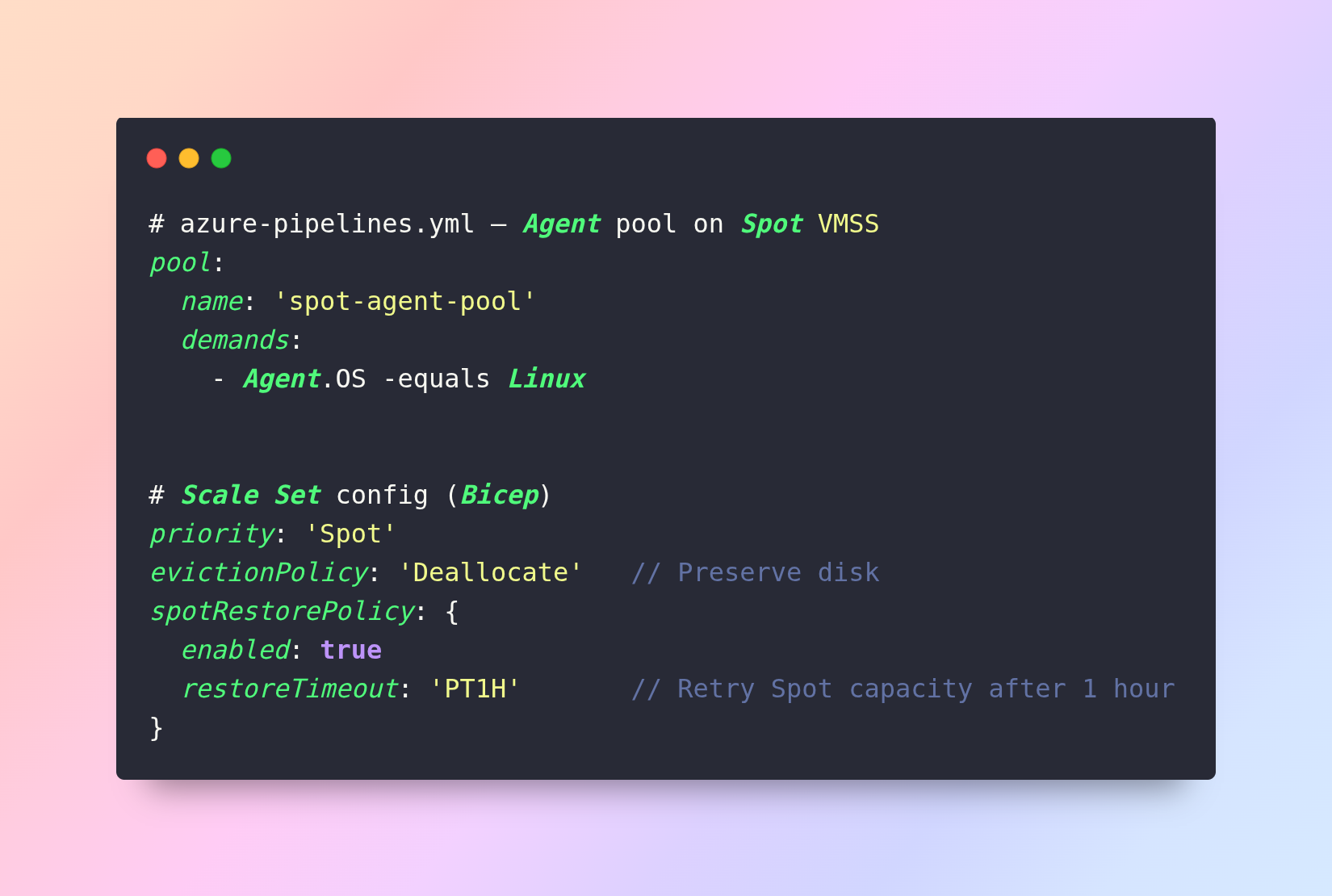
- Eviction Policy: Set to Deallocate rather than Delete. This preserves the disk and configuration, allowing the VM to simply restart when capacity becomes available again.
- Orchestration: Use Azure Machine Learning or AKS Spot Node Pools to manage the interruption risk automatically.
Financial Impact Scenario: The Modernization Pivot
- The Scenario: 500 VMs are moving to AKS (Kubernetes) over 18 months.
- Inefficient Strategy: Buying 3-year RIs for all VMs. As they move to AKS, the RIs become "Stranded."
- Engineered Strategy: Purchase 3-year RIs for the Database Layer only. Purchase a 1-year Savings Plan for the Web/App layer.
The Result: You capture a 25% discount immediately while maintaining the agility to change VM families as the Kubernetes migration progresses.
Reserved Capacity for Data Services and Storage
Optimizing the Persistence Layer
While compute is often ephemeral, data is permanent. This permanence makes data services ideal candidates for long-term commitments. However, the metrics for "Commitment Floors" in data services differ significantly from VMs. We shift our focus from vCPU hours to vCore-seconds, Request Units (RUs), and GB-months.
Azure SQL Reserved Capacity Engineering
Azure SQL (Single Database, Elastic Pool, and Managed Instance) offers up to 55% savings through Reserved Capacity. When stacked with licensing benefits, this becomes the highest-yield optimization in the Azure ecosystem.
The vCore Commitment Framework
Unlike VMs, SQL Reserved Capacity is purchased in increments of vCores.
- The Math: If you have ten 4-vCore databases, you require a commitment of 40 vCores.
- Flexibility: Azure SQL Reserved Capacity is "Size Flexible" within the same service tier (General Purpose vs. Business Critical). An 8-vCore reservation can cover two 4-vCore databases.
The "License Stacking" Force Multiplier
The Azure Hybrid Benefit (AHB) for SQL Server allows you to use your existing on-premises licenses to waive the "SQL software" portion of the bill.
|
Pricing Component |
On-Demand |
RI + AHB (3-Year) |
Total Discount |
|
Compute (vCore) |
$100 |
$45 |
55% |
|
SQL License |
$150 |
$0 |
100% |
|
Total |
$250 |
$45 |
82% |
Executive Insight: Running SQL Server in Azure without AHB is essentially paying twice for the same software. This is the single largest "hidden" saving for enterprise customers.
Cosmos DB: Request Unit (RU/s) Optimization
Cosmos DB is a "throughput-provisioned" service. The primary cost driver is Request Units per second (RU/s).
Reserved Capacity vs. Autoscale
- Reserved Capacity: You commit to a fixed amount of RU/s (e.g., 50,000 RU/s) for 1 or 3 years.
- Autoscale: You set a maximum (e.g., 50,000 RU/s), and Azure scales down to 10% (5,000 RU/s) during idle periods.
Technical Strategy: The "Hybrid Throughput" Model
Do not reserve your "Autoscale Peak." Instead, reserve your "Steady-State Floor."
- Identify the RU/s level your database never drops below (e.g., 20,000 RU/s).
- Purchase Reserved Capacity for that 20,000 RU/s.
- Set the remaining 30,000 RU/s to Standard Provisioned or Autoscale.
Blob Storage Reserved Capacity
Storage is often seen as "cheap," but at the Petabyte scale, it becomes a multi-million dollar line item. Azure offers Reserved Capacity for Blob Storage (Block Blob) in 100 TB or 1 PB increments.
Tiering Before Reserving
Before committing to storage capacity, you must automate Lifecycle Management.
- Hot Tier: Frequent access (highest storage cost, lowest access cost).
- Cool Tier: Infrequent access (30+ days).
- Archive Tier: Rare access (180+ days, lowest storage cost).
Technical Rule: Apply Reserved Capacity only to the Hot and Cool tiers. Archive storage is already discounted to a level where commitments yield diminishing returns.
Redundancy Modeling
Discounts vary by redundancy level (LRS, GRS, ZRS).
- LRS (Locally Redundant): Highest discount (up to 38%).
- GRS (Geo-Redundant): Lower discount percentage.
- Executive Strategy: Standardize non-critical logs and dev-data on LRS before applying reservations.
Microsoft Fabric Capacity Units (FCUs)
- As enterprises consolidate their analytics, Power BI, and data engineering workflows onto Microsoft Fabric, a new commitment instrument has become available that most FinOps teams are not yet leveraging: Fabric Capacity Units (FCUs).
- Microsoft now offers FCU reservations in 1-year increments with approximately 40.5% savings compared to pay-as-you-go Fabric capacity pricing. FCUs cover the full range of Fabric workloads — Power BI Premium, Data Factory, Synapse Data Engineering, Real-Time Analytics, and Data Activator.
- For organizations spending $200K+ annually on Power BI Premium or Fabric capacity, FCU reservations should be evaluated as part of the same commitment portfolio conversation as SQL and Blob storage reservations. This is an emerging optimization that is frequently missed because Fabric spend is often managed by the Data team, not the FinOps team.
Note: Ensure your FinOps team has visibility into Fabric capacity spend in Cost Management. FCU reservations are purchased through the same Azure Reservations portal and follow identical governance procedures.
The "Data-Gravity" Cost Scenario
The Scenario: A global retail enterprise has 400 TB of SQL data and 2 PB of log data.
- Inefficiency: Running all SQL on-demand with GRS (Geo-Redundant) storage.
- The Engineering Fix:
- Downsize SQL vCores based on 95th percentile utilization.
- Implement AHB across all 300 vCores.
- Move 1.5 PB of logs to Archive Tier using Lifecycle Policies.
- Commit to 1 PB of Cool Blob Storage Reserved Capacity.
Financial Impact: Reduced annual data spend from $1.8M to $850k — a 53% reduction achieved through the combination of rightsizing, AHB, storage tiering, and reserved capacity.
Risk Modeling, Governance, and Executive Reporting
Sustaining the Effective Savings Rate (ESR)
A 3-year commitment is a probabilistic bet on the future of your technology stack. Without a structured risk framework, an enterprise risks "Commitment Lock-in"—a state where the financial department’s desire for discounts prevents the engineering department from adopting superior, modern architectures.
Risk & Sensitivity Modeling: The "Probabilistic" Commitment
Executives must treat cloud commitments like a financial portfolio. You are balancing Yield (Discount %) against Liquidity (Flexibility to change).
Scenario-Based Sensitivity Analysis
Before finalizing a $10M commitment, model three scenarios:
- Growth (+20%): Does the commitment leave enough room for "Spot" and "On-Demand" to handle spikes without massive over-coverage?
- Contraction (-15%): If a business unit is sold or a product is sunset, will we have "Stranded Capacity"?
- Modernization (The "Pivot"): If 40% of VMs move to Serverless (PaaS) in Year 2, does the RI expire or can it be exchanged?
Executive Formula: Expected Commitment Value (ECV)
ECV= Σ(Scenario_Probability x Outcome_Savings)
Multi-Region & Disaster Recovery (DR) Governance
Enterprise cloud estates are rarely single-region. A mature strategy differentiates between Active and Standby regions.
Asymmetric Commitment Logic
In a Geo-Redundant architecture, your Primary region might run 100 nodes, while your DR region runs 10 (scaling to 100 only during failure).
- The Error: Purchasing 100 RIs in both regions.
- The Engineering Fix: * Purchase 100 RIs for the Primary.
- Purchase zero RIs for the DR region.
- Use a Savings Plan to cover the 10 nodes in DR, providing flexibility if you decide to change DR regions later.
Enterprise Billing & The Centralized FinOps Model
Decentralized cloud purchasing leads to "Discount Fragmentation."
The Centralized "Cloud Bank"
Establish a central FinOps team that "owns" all RIs and Savings Plans.
- Mechanism: The central team buys RIs at the Enrollment Level.
- Internal Chargeback: Business units are charged the "Discounted Rate," but if a unit scales down, the central "bank" automatically reassigns that RI to another department.
- Benefit: This maximizes the Utilization %, ensuring the enterprise never pays for a "Stranded" reservation.
The Executive KPI Dashboard: Measuring Success
Executives should not look at "Total Spend" in isolation. They must look at efficiency metrics.
The Top 3 Executive KPIs
|
KPI |
Definition |
Target |
Warning Threshold |
|
Effective Savings Rate (ESR) |
(On-Demand Cost − Actual Cost) / On-Demand Cost |
35% – 55% |
< 25% |
|
RI/SP Utilization |
% of purchased commitments actively consumed |
> 95% |
< 85% |
|
Commitment Coverage |
% of eligible spend covered by a discount instrument |
60% – 80% |
< 50% |
The "Cost of Inaction" Report
Quarterly, the FinOps team should present the "Unrealized Savings" report. This quantifies the dollars lost by remaining on Pay-As-You-Go for stable workloads.
"By delaying the 3-year SQL commitment by 6 months, the enterprise lost $450,000 in guaranteed discounts."
Advanced Anti-Patterns: What to Avoid
- The "Penny Wise, Pound Foolish" Rightsizing: Spending 100 engineering hours to save $50/month on a VM. Focus on the Top 10% of resources, which usually drive 80% of the cost.
- Modernization Blindness: Committing to 3-year Windows RIs when the CTO has mandated a shift to Linux/Containers by next year.
- Over-Commitment: Committing to 100% of capacity. Always leave a 15–20% "Agility Buffer" to allow for architectural experimentation.
- Auto-Renewal Neglect: Allowing Savings Plans to auto-renew without a formal 60-day pre-expiry governance review.
- Single-Scope Fragmentation: Purchasing department-level single-scope RIs rather than enrollment-level Shared Scope, leading to stranded reservations when teams restructure.
The Advanced Mathematical Modeling: The Modernization 'Pivot'
If you commit to a 3-year RI today, and a more efficient VM generation or a serverless AI-as-a-Service model launches in Year 2, is your capital trapped?
The Portfolio Exchange Formula
A world-class FinOps team treats reservations as Tradeable Assets. Let Vr be the remaining value of your current commitment, and Dn be the discount of a new, more efficient service. The 'Pivot' is mathematically justified if:
(Cost_New × (1 − D_n)) < (Cost_Old × (1 − D_o))
If the net cost after discount on the new service is lower than the net cost on the current service, the exchange is justified — regardless of the nominal discount percentage.
Azure's Savings Plan is the ultimate hedge here. Because it covers 'Compute' broadly, you can move from D-Series VMs to Azure Functions or Azure Container Apps without losing your discount.
DEVOPS & FINOPS INTEGRATION
By now, we’ve covered in depth what to buy and when. Now, let's address the most important question enterprise architects consistently fail to answer: how do you build a system that stays cost-optimized automatically, without relying on monthly manual reviews?
The answer is Azure DevOps. It is a fully native Microsoft platform comprising Azure Boards, Azure Repos, Azure Pipelines, Azure Artifacts, and Azure Test Plans — and it is the execution layer where 80% of the FinOps lifecycle actually happens. Every VM, AKS cluster, SQL database, and storage account discussed in this guide gets deployed through a pipeline. If cost governance is not embedded in that pipeline, the FinOps team is permanently in reactive mode.
Infrastructure-as-Code (IaC): The Cost Governance Enforcement Layer
The single most impactful DevOps change an enterprise can make for cost optimization is mandating that all Azure infrastructure is provisioned exclusively through code — Bicep or Terraform — checked into Azure Repos. Manual portal deployments bypass every tagging policy, SKU standard, and rightsizing guideline established above.
Enforcing Tagging at Deploy Time with Bicep
We already established that tagging coverage below 95% creates stranded cost risk. The correct place to enforce this is not a retroactive Azure Policy scan — it is the IaC template itself:
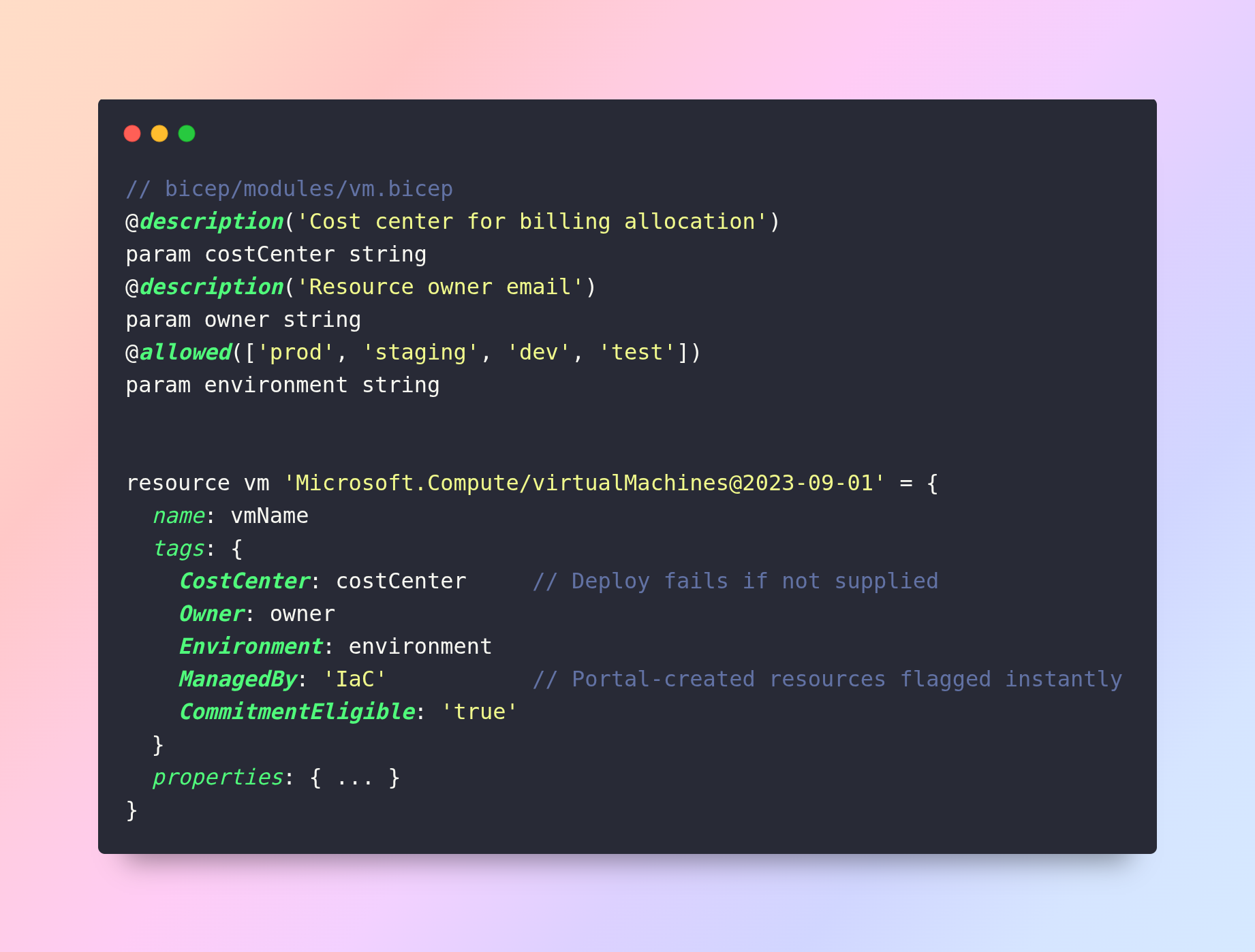
The ManagedBy: IaC tag is particularly powerful — any resource without it was created outside the governed pipeline and can be automatically flagged as a zombie candidate in the KQL queries. This creates a closed loop: IaC stamps resources on the way in, KQL catches anything that slipped through.
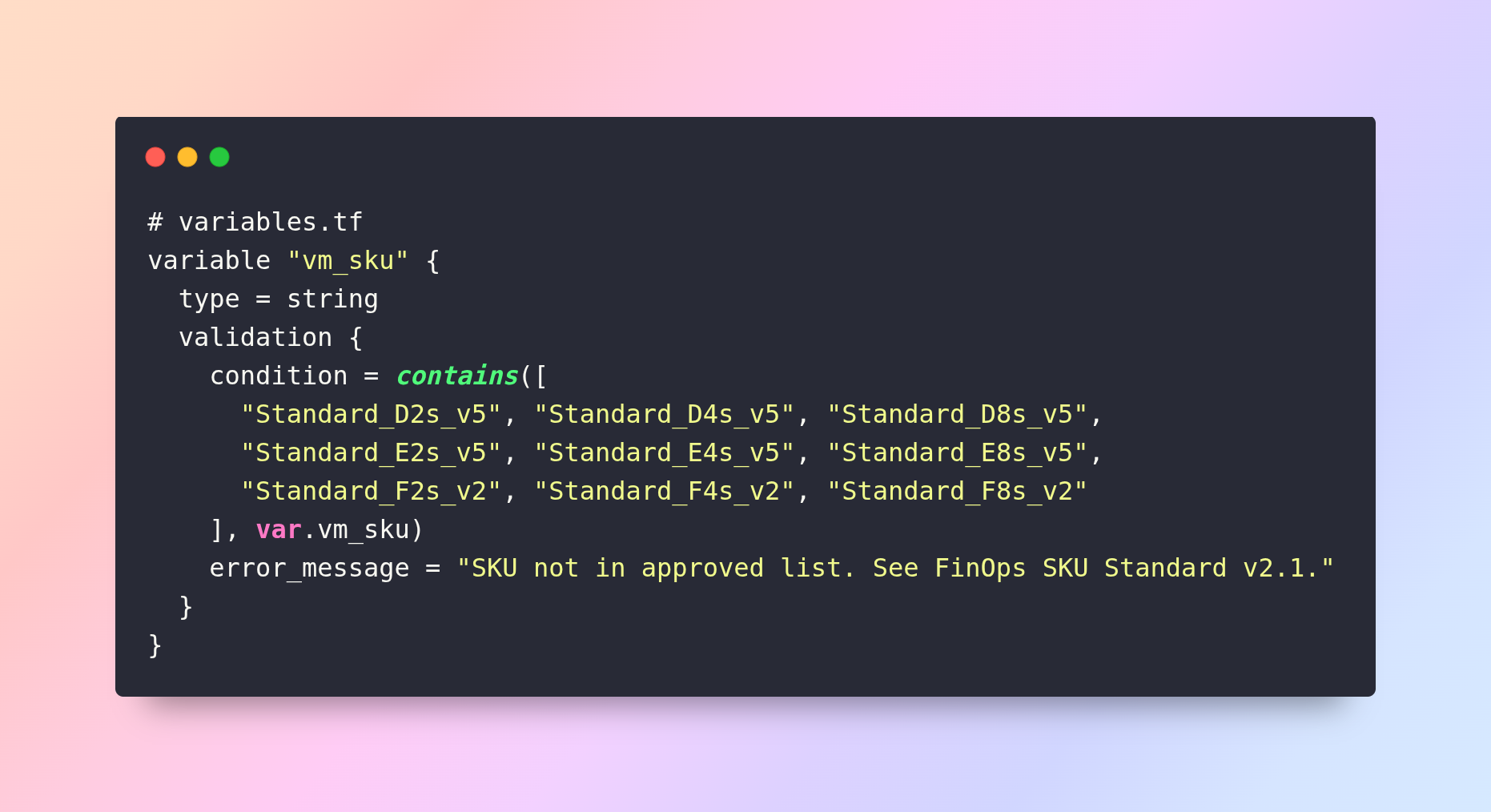
SKU Standards Enforced via Terraform Validation
The SKU Standardization Index is enforced programmatically at the Terraform variable level — any PR attempting a non-standard SKU fails validation before reaching Azure:
Azure Pipelines: CI/CD Cost Optimization
For most enterprises, pipeline infrastructure — build agents, test environments, staging clusters — represents 15–25% of total Azure compute spend. Yet it is almost never included in RI or Savings Plan modeling because it is managed by engineering, not FinOps. This is a structural blind spot that DevOps-FinOps integration directly closes.
Spot Instances for Self-Hosted Pipeline Agents
Azure Pipelines supports self-hosted agents backed by VM Scale Sets. Running these on Spot Instances delivers up to 80% cost reduction vs. Microsoft-hosted agents for non-latency-sensitive workloads:
|
Agent Type |
Typical Cost |
Interruption Risk |
Best For |
|
Microsoft-hosted |
$0.008/min (~$5.76/hr) |
None |
Low-volume, simple builds |
|
Self-hosted On-Demand |
~$0.19/hr (D4s_v5) |
None |
Predictable, latency-sensitive |
|
Self-hosted Spot |
~$0.04/hr (80% off) |
Low-Medium |
Batch builds, nightly tests |
|
Self-hosted RI-backed |
~$0.08/hr (3-yr RI) |
None |
Always-on runner pools |
Automatic Environment Teardown
Long-lived staging environments spun up for feature branches and never torn down are one of the largest sources of zombie resources. In a mature Azure Pipelines setup, the environment lifecycle is managed entirely by the pipeline:
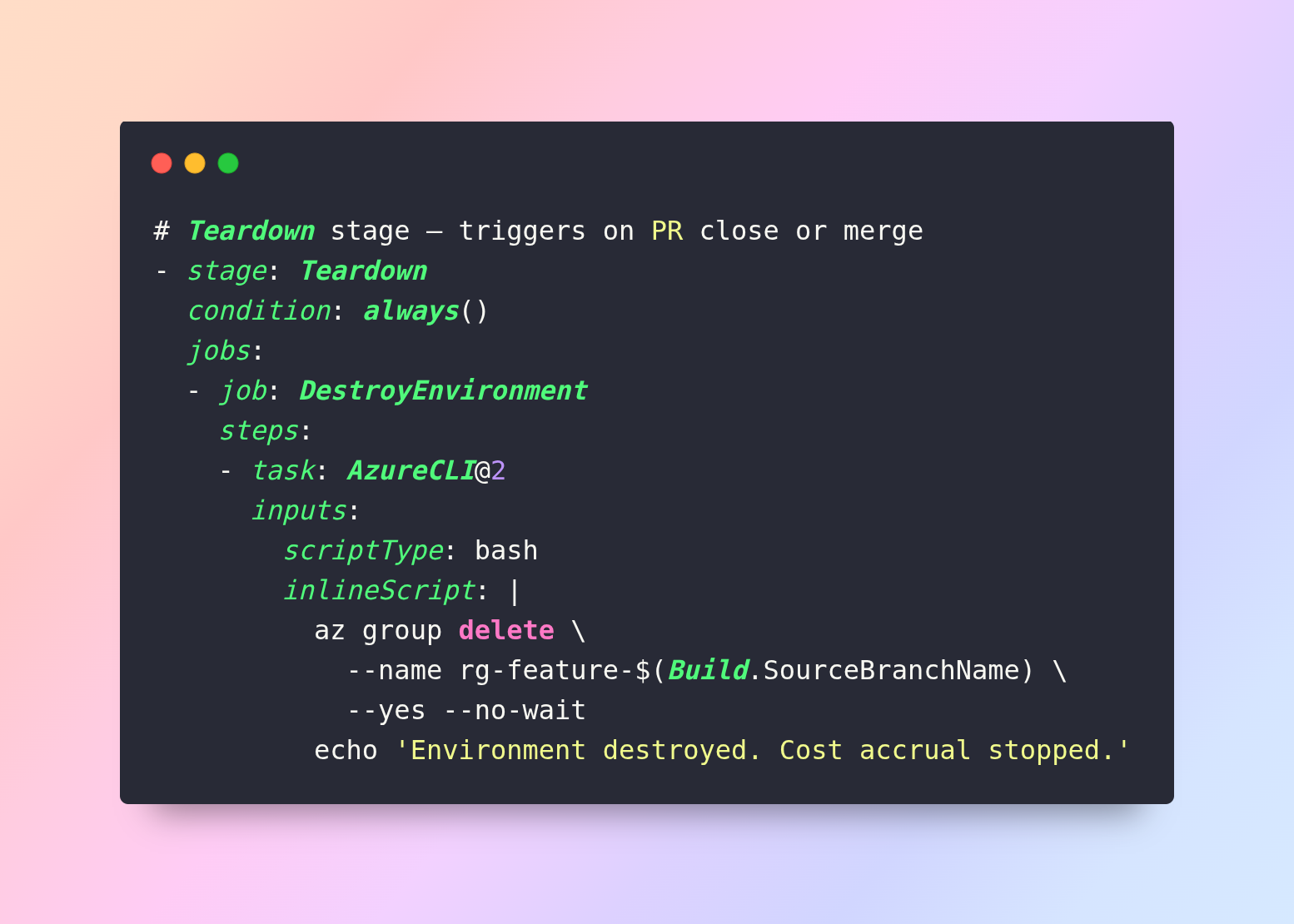
Combined with the Logic Apps zombie sweep, this creates a two-layer zombie elimination system: prevention at the pipeline level and automated cleanup as a safety net.
Shift-Left FinOps: Cost Checks in the Pull Request
Shift-left FinOps surfaces cost impact to engineers at the point of code change — in a pull request — rather than weeks later in a Cost Management report. When an engineer can see that their Terraform change will increase monthly spend by $4,200 before they merge, the cost conversation happens at the cheapest possible moment to act on it.
Infracost Integration with Azure Pipelines
Infracost is an open-source tool that parses Terraform or Bicep plans and produces a cost diff — the before/after monthly cost impact of any infrastructure change — posted as a comment on every PR:
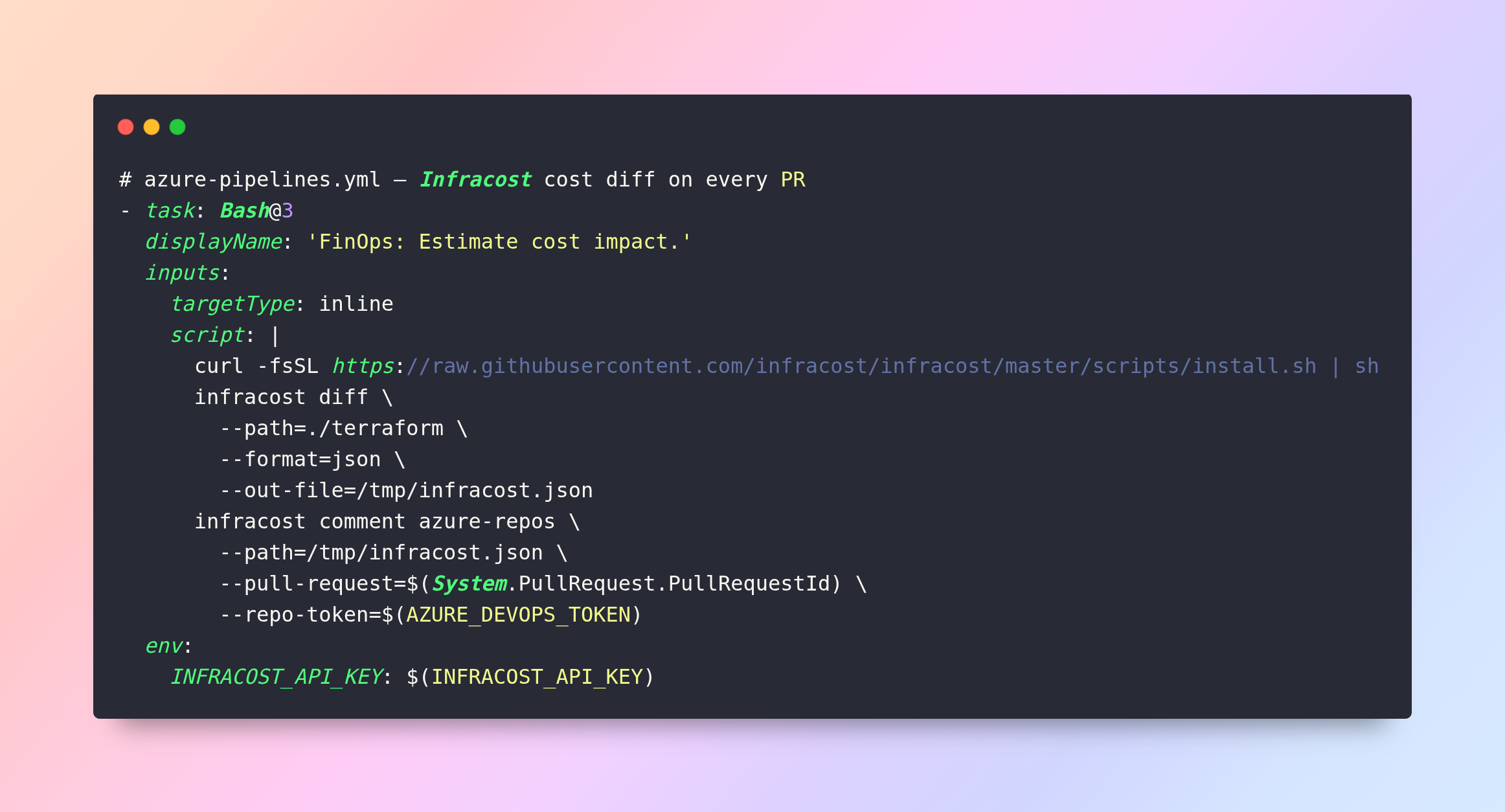
Every PR touching infrastructure now shows: 'This change increases monthly cost by +$1,840 (+12%). Primary driver: D8s_v5 to D16s_v5 resize.' Engineers either justify the change or reconsider the SKU — without any FinOps team involvement.
Azure Policy as a Pipeline Gate
Azure Policy runs not just as a reactive scanner but as a hard deployment gate via the AzurePolicyCheckGate task — blocking any deployment that violates cost governance rules before it reaches production:
|
Policy Rule |
Effect |
FinOps Connection |
|
Missing CostCenter/Owner tag |
Deny deployment |
Tag Governance |
|
Non-standard VM SKU |
Deny deployment |
SKU Standardization |
|
Public IP on DB subnet |
Deny deployment |
Security + egress cost |
|
Resource in a non-approved region |
Deny deployment |
Multi-region governance |
|
Unattached disk older than 7 days |
Audit + Alert |
Zombie elimination |
GitOps-Driven Commitment Governance
The most mature FinOps organizations treat their reservation portfolio the same way they treat application infrastructure — as code, version-controlled, peer-reviewed, and deployed through a pipeline. Every RI purchase, exchange, or cancellation is a pull request with a reviewer, a business justification, and a cost model attached. This creates the audit trail and governance discipline that finance and compliance teams require.
Reservation Portfolio as Code
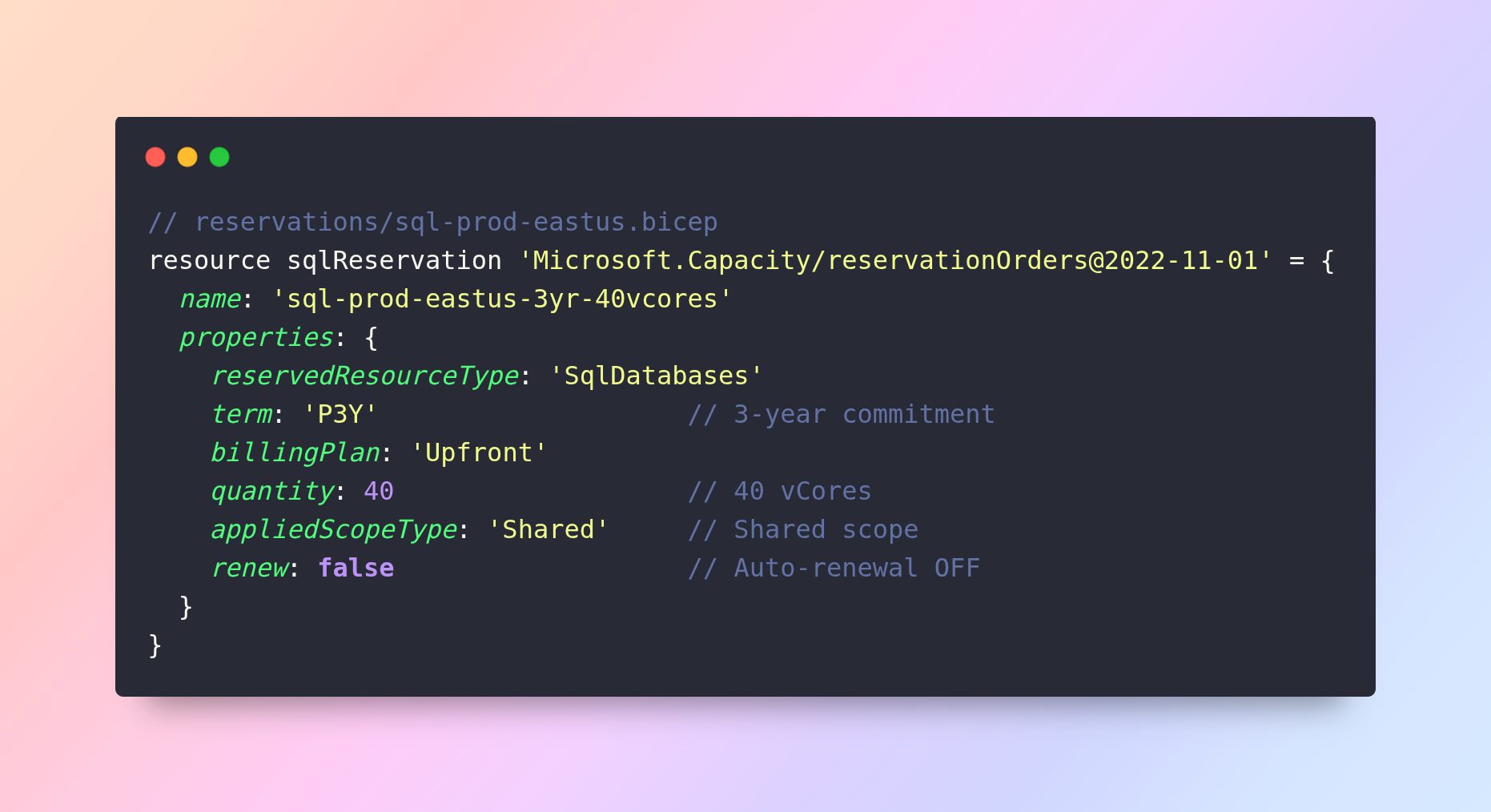
Automated Monthly Commitment Review Pipeline
The governance pipeline runs on a scheduled trigger — monthly for utilization review, and 60 days before any reservation expiry, directly addressing the auto-renewal risk:
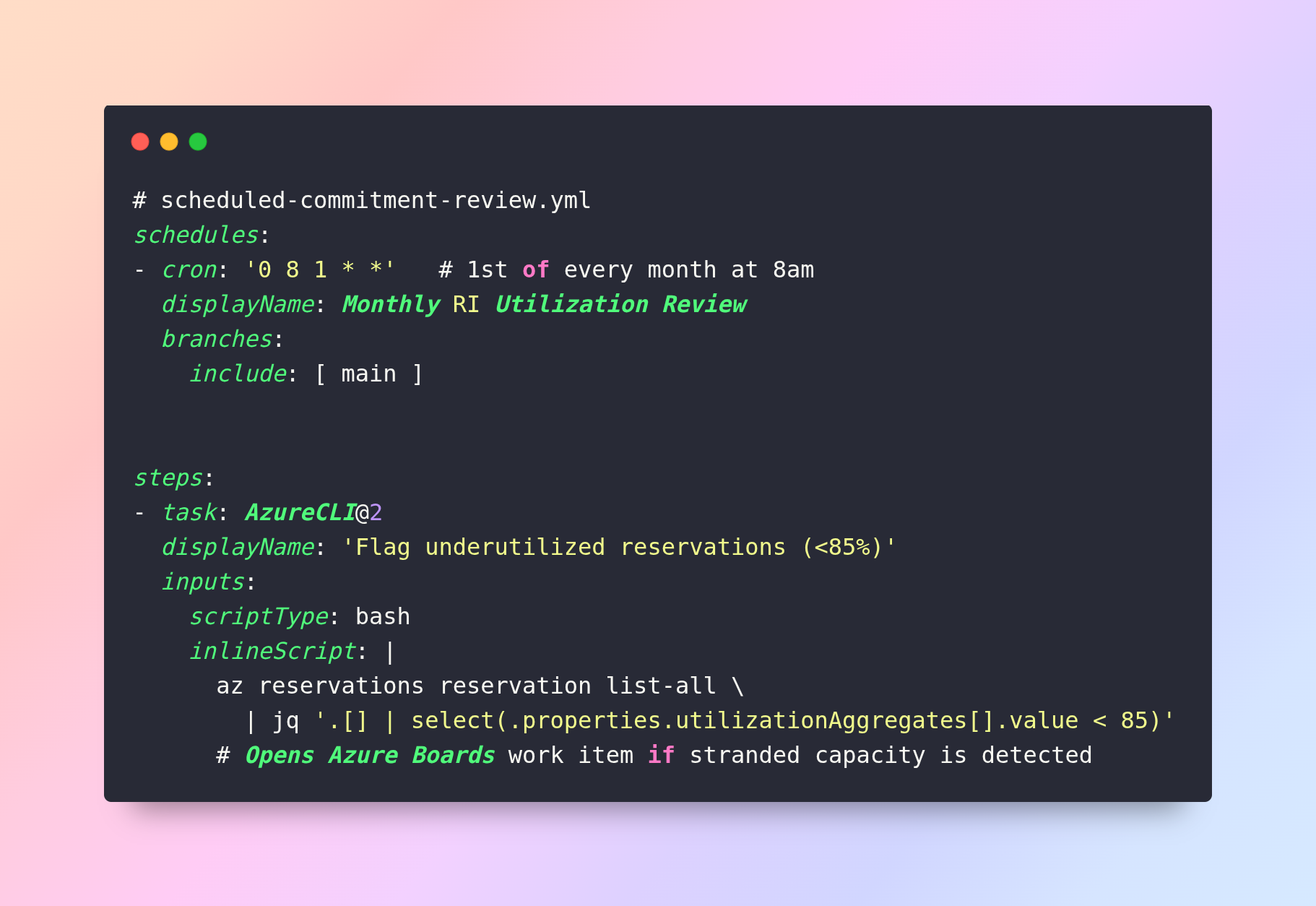
This pipeline closes the governance loop from the Master Lifecycle — the 'Govern' phase is no longer a manual calendar reminder but an automated, auditable process that runs regardless of team availability.
DevOps + FinOps Anti-Patterns
|
Anti-Pattern |
Cost Impact |
DevOps Fix |
|
Portal-deployed resources (no IaC) |
Untagged, wrong SKU, no lifecycle |
Enforce IaC-only via Azure Policy |
|
Long-lived feature branch environments |
Zombie VMs & disks accumulate |
Automatic teardown on PR close |
|
Hardcoded VM sizes in pipeline YAML |
No rightsizing flexibility |
Parameterize SKU via variable groups |
|
No cost diff on infrastructure PRs |
Cost surprises at billing cycle |
Infracost on all IaC pull requests |
|
Manual RI purchases (no audit trail) |
Wrong scope, auto-renewal risk |
GitOps reservation portfolio |
|
Always-on build agents on On-Demand VMs |
100% on-demand premium for burst |
Spot VMSS agent pools |
DevOps + FinOps: The Four Pillars1. IaC Enforcement — All infrastructure via Bicep/Terraform in Azure Repos. Tags and SKU standards enforced at template level, not retroactively.2. Pipeline Cost Optimization — Self-hosted agents on Spot VMSS. Ephemeral environments with automatic teardown on PR close.3. Shift-Left FinOps — Infracost cost diffs on every infrastructure PR. Azure Policy as a pipeline gate. Engineers own cost before merge.4. GitOps Governance — Reservation portfolio as code. Automated monthly utilization review. 60-day pre-expiry alerts as scheduled pipelines, not calendar reminders.
Conclusion: The Master Lifecycle
Cloud Cost Engineering is not a project; it is a Continuous Loop. The maturity of your FinOps practice is measured not by the depth of any single optimization, but by the speed at which the loop completes.
|
Phase |
Activity |
Owner |
Cadence |
|
Inform |
Tag, monitor, establish baseline via Advisor + KQL |
FinOps + Engineering |
Continuous |
|
Optimize |
Rightsize, delete zombies, tier storage, ladder commitments |
Engineering |
Quarterly |
|
Operate |
Purchase stacked commitments, apply AHB, and manage exchanges |
FinOps + Finance |
Monthly |
|
Govern |
Review KPIs, model risks, adjust portfolio, ESG reporting |
FinOps + CFO |
Quarterly |
By institutionalizing this four-part framework, the enterprise converts the cloud from a source of "Bill Shock" into a precision-engineered platform for global growth.

 Next
NextResearch
Our team of dedicated developers has provided well-researched articles that help to build future-ready organizations using technology innovation.
Get All Insights

Is BlockChain Technology Worth The H ...
Unfolds The Revolutionary & Versatility Of Blockchain Technology ...


IoT Technology - A Future In Making ...
Everything You Need To Know About IoT Technology ...
Feel Free to Contact Us!
We would be happy to hear from you, please fill in the form below or mail us your requirements on info@hyperlinkinfosystem.com
Hyperlink InfoSystem Bring Transformation For Global Businesses
Starting from listening to your business problems to delivering accurate solutions; we make sure to follow industry-specific standards and combine them with our technical knowledge, development expertise, and extensive research.

4500+
Apps Developed

1200+
Developers

2200+
Websites Designed

140+
Games Developed

120+
AI & IoT Solutions

2700+
Happy Clients

120+
Salesforce Solutions

40+
Data Science

